
Gling cuts your takes. Scenaristo does it without the hour meter.
Gling is the best-known tool for cutting bad takes, silences and filler words from a talking-head recording, and it is good at it. It meters footage in hours a month, watermarks free exports, and leads with "Upload your raw footage." Scenaristo is a native desktop app where nothing you run locally is metered. Every Gling fact on this page links to Gling's own pages.
| How it compares | SScenaristoOn-device desktop | GGlingWeb and desktop app |
|---|---|---|
| Usage meter | None. Nothing you run locally is metered; your hardware is the only limit. | Free 1 hour, Plus 10, Pro 30, Elite 100 hours of "AI edited media" a month. "Unused hours do not 'pass' from one month to the next."gling.ai/pricing |
| Price | Free today. scenaristo.com/download | $0, $20, $40 or $100 a month; $10, $20 or $50 a month paid annually.gling.ai/pricing |
| Free tier | No watermark, and the timeline export to your NLE is included. | "Your exported videos will include a watermark and you won't be able to export to Premiere, Final Cut or Resolve."gling.ai/pricing |
| Where your footage goes | Stays on your disk. The whole workflow runs with the network off. | Gling's homepage leads with "Upload your raw footage." Its desktop page does not say where processing runs.gling.aigling.ai/desktop |
| Platforms | Mac and Windows desktop. | Web app, plus Mac and Windows desktop. Gling also runs in a browser.gling.ai/desktop |
| Transcription languages | 68 languages end to end: transcribe, edit, and burn in captions. Interface in English, Spanish and French. | Gling's FAQ lists 24, with an English-only interface. Six of them we do not claim: Hebrew, Hindi, Arabic, Chinese, Korean and Japanese.gling.ai/pricing |
| Bad takes, silences, fillers | Yes: inline take review in the transcript, a configurable silence threshold, and filler words. | Yes, this is what Gling is built for.gling.ai |
| Audio | Noise and echo removed on your machine, and loudness mastered to a target (Podcast −16 LUFS, social −14 LUFS) with an A / B before you accept. | "Speech audio enhancement" and "Reduce noise."gling.ai |
| Captions | SRT and WebVTT, or burned in and styled from the Timeline toolbar. | "AI Captions," with SRT export.gling.ai |
| Auto zoom on jump cuts | Zoom jump cuts. | "Auto framing (Zoom in/out)."gling.ai |
| Speaker labels | Speaker diarization, with a control for how many speakers to find. | Not listed on Gling's pricing, desktop or home pages.gling.ai/pricing |
| Timeline handoff to your NLE | FCPXML with every export: cuts, crossfades, and chapter markers intact. scenaristo.com/features | XML to Premiere, Final Cut Pro and Resolve, on paid plans only.gling.ai/pricing |
| Multicam | No. | Yes, when exporting to Resolve or Final Cut. Otherwise Gling's FAQ says to sync the cameras before uploading.gling.ai/pricing |
| AI B-roll | No. Text, image and video overlays you place yourself; nothing is generated. | "AI B-rolls," generated for you.gling.ai |
| YouTube growth tools | No. Scenaristo is an editor, not a channel assistant. | Title generator, chapter generator and next-video suggestions.gling.ai |
Every Gling cell links to the page it was checked against, verified on 29 September 2026. Plans change often; the linked page is the current truth, and we re-check quarterly. The last three rows are ones Scenaristo loses on purpose: they are what Gling is built for. Gling is a trademark of its owner. The wider comparison, including Descript and Riverside, is at scenaristo.com/compare.
An allowance that resets. And does not carry over.
Gling counts the hours of footage it edits: 1 on Free, up to 100 on Elite, per month. Its own FAQ is plain about the reset: unused hours do not pass from one month to the next.
Scenaristo has no allowance to spend. Cut a three-hour interview, redo it with a different silence threshold, export twice: no counter moves, because there is no counter.
Speakers labelled, in the transcript.
Scenaristo separates who said what and lets you set how many speakers to look for, so a two-person interview reads as a conversation instead of a wall of words. Gling does not list speaker labels on its pricing, desktop or home pages.
The timeline sits under the transcript, so when a cut lands mid-breath you fix it by the frame and the text never falls out of sync.
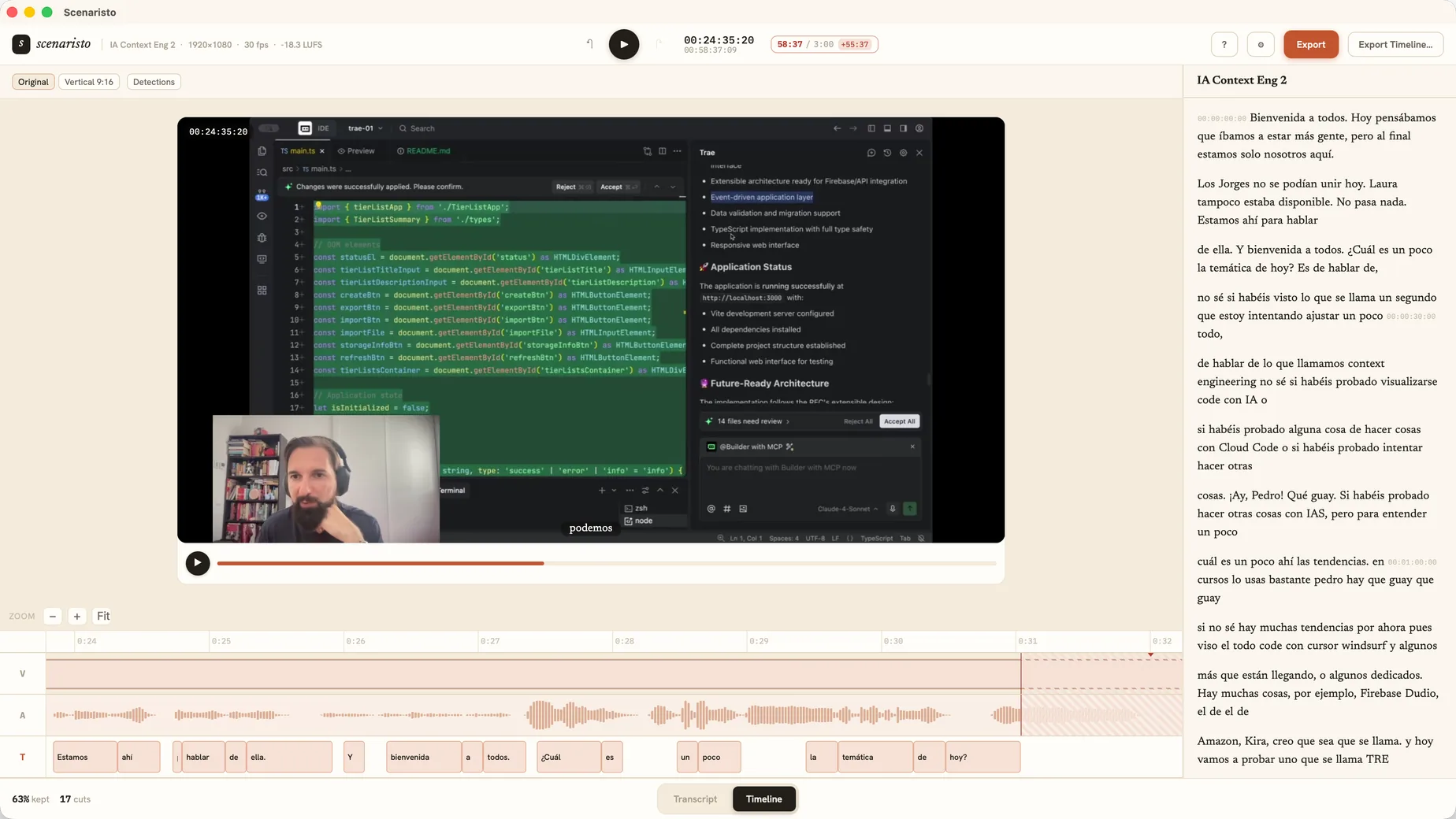 Timeline view · synced with the transcript
What Gling does that Scenaristo does not.
Gling cuts multicam footage on the way to Resolve or Final Cut, generates B-roll, and suggests titles, chapters and your next video. If your channel runs on those, Gling earns its place. If your workflow is record, cut, ship, then the editor is the whole job, and that is what Scenaristo is for: the fast first pass and the clean handoff, on your own machine.
Drop in your last video.
Nothing is counting.
macOS · Windows · no account, no upload