
Text-based video editing, without the meter.
Descript and Riverside share the premise: edit video by editing words. They are capable tools, and both sell the compute behind them, metered in media minutes, AI credits, and separate-track hours. Scenaristo runs on your machine instead, so nothing you run locally is metered. Here is the side-by-side, with every competitor fact linked to the vendor's own page.
| How it compares | SScenaristoOn-device desktop | DDescriptCloud studio | RRiversideRecord + edit |
|---|---|---|---|
| Usage meter | None. Nothing you run locally is metered; your hardware is the only limit. | Media minutes, 1 to 40 hours a month by plan, plus AI credits.descript.com/pricing | Separate-track downloads capped at 15, 20 or 25 hours a month below Business.riverside.com/pricing |
| Edit with the network off | Yes. Import, transcribe, edit, and export offline. | No. Projects live in Descript's cloud file storage.descript.canny.io | Editing runs in Riverside's online studio; capture is built to ride out dropouts.riverside.com |
| Where your footage goes | Stays on your disk. Nothing uploads. | "We've since moved to full cloud-based file storage." Descript, December 12, 2025.descript.canny.io | Stored with Riverside; the tiers meter how many hours of separate tracks you download back.riverside.com/pricing |
| Account required | No account, no sign-in. | Sign-up starts every plan, including Free.descript.com/pricing | Sign-up starts every plan, including Free.riverside.com/pricing |
| Transcription engines | Named and versioned: Parakeet TDT, Canary, Cohere Transcribe, Whisper Large v3 and v3 Turbo. Switch models and re-run free. scenaristo.com/models | Not named on the pricing or transcription pages.descript.com/transcription | Not named on the pricing page.riverside.com/pricing |
| Export resolution | Source resolution on every export. | 720p local export on Free and Hobbyist; 4K on Creator and Business.descript.com/pricing | Up to 720p on Free; up to 4K on paid plans.riverside.com/pricing |
| Timeline handoff to your NLE | FCPXML with every export: cuts, crossfades, and chapter markers intact. scenaristo.com/features | "Timeline export is available on Creator, Business, and Enterprise plans."help.descript.com | "Non-destructive timeline exports" on the Business plan.riverside.com/pricing |
| Records remote guests | No. Scenaristo edits what you recorded elsewhere. | Yes: Rooms remote recording, 2 to 25 hours a month by plan.descript.com/pricing | Yes. This is what Riverside is best at.riverside.com |
| Breadth | Deliberately narrow: a transcript editor with a real timeline. | A broad studio: recording, collaboration, AI tools, publishing.descript.com | A recording-first platform: studio, editor, clips, webinars.riverside.com |
Every competitor cell links to the vendor page it was checked against, verified on August 4, 2026. Plans and boundaries change often, so the linked page is the current truth; we re-check quarterly. The last two rows are ones Scenaristo loses on purpose: they are what those products are for. The wider field (Reduct, Choppity, Kapwing and others) makes related trades; we compare in depth against the two most used, and against Gling, in its own page. Descript, Riverside, Gling, Reduct, Choppity, and Kapwing are trademarks of their respective owners. The full Descript comparison, including what a multicam podcast draws from the meter, is at scenaristo.com/vs/descript.
One meters the work. The other already gave you the machine.
Cloud editors resell compute: uploading debits media minutes, AI features draw credits, and the caps reset monthly whether you shipped an episode or not.
Scenaristo spends your hardware instead. Transcribe a three-hour interview, re-run it with a different model, export twice: no counter moves, because there is no counter. A second pass never costs anything, because there is nothing to charge.
Text for speed. A timeline for the last 5%.
Pure text editors are fast right up until a cut lands mid-breath or in a non-speech moment. Then you want frames, not sentences.
Scenaristo keeps a full timeline under the transcript: trim a boundary by the frame, blade a silent region, nudge a cut, and the text view never falls out of sync. You get the speed of words and the precision of an NLE.
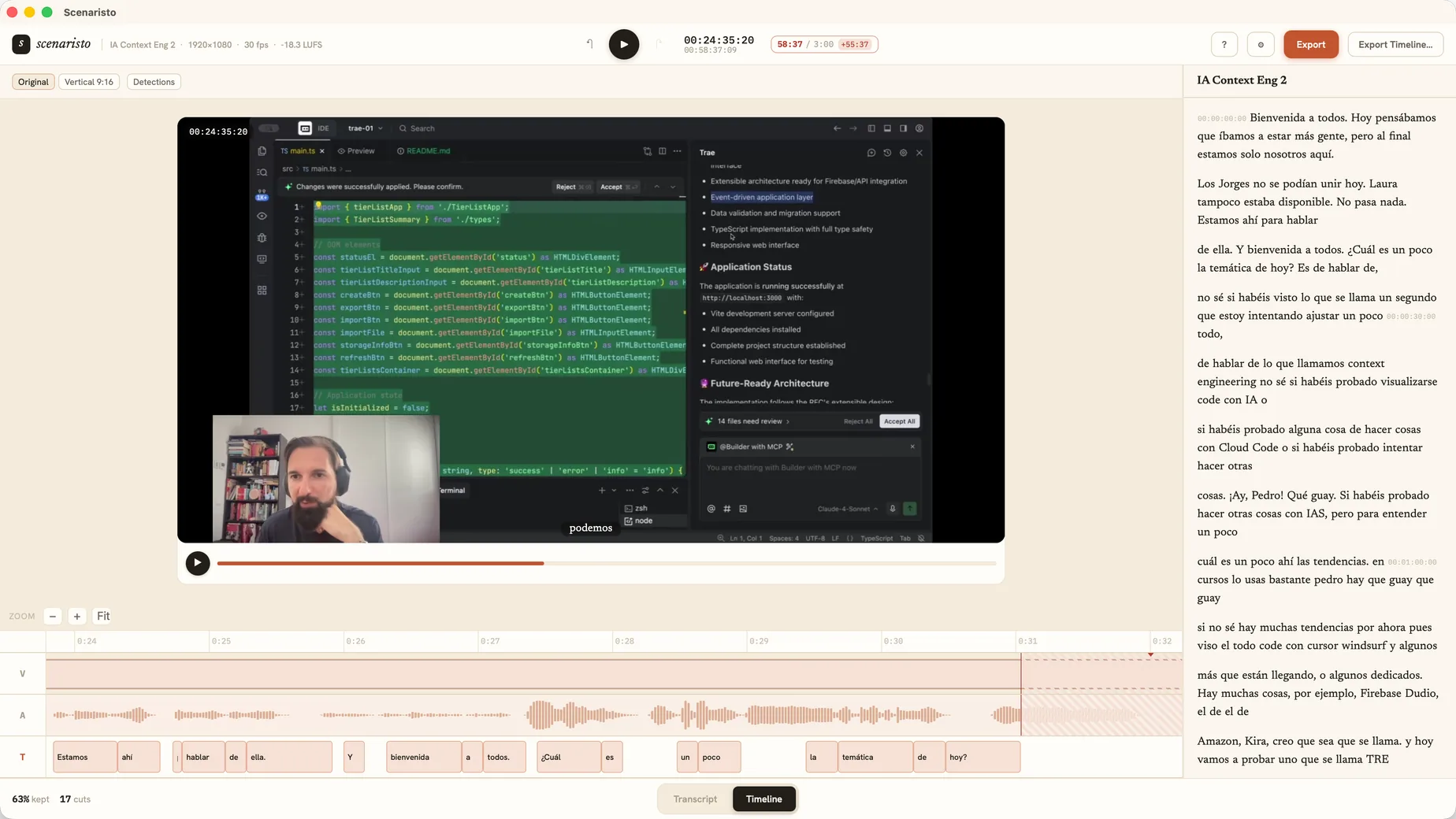 Timeline view · synced with the transcript
Scenaristo vs the clip tools.
OpusClip and CapCut solve a related but different problem: turning long recordings into vertical Shorts. Here's how the approach differs.
| How it compares | SScenaristoOn-device desktop | OOpusClipCloud AI clipper | CCapCutFree manual editor |
|---|---|---|---|
| Runs fully on your device | Full support | Not offered | Limited |
| Footage never uploaded | Full support | Not offered | Limited |
| Works offline | Full support | Not offered | Limited |
| No account required | Full support | Not offered | Not offered |
| Pick the clip by reading the transcript | Full support | Not offered | Not offered |
| Burned-in captions & 9:16 reframe | Full support | Full support | Full support |
| AI moment detection & virality scoring | Not offered | Full support | Not offered |
| Auto-posting & scheduling | Not offered | Full support | Limited |
Scenaristo doesn't pick the moment for you or score it for virality. You choose the clip by reading the transcript, and Scenaristo ships the file, without anything leaving your machine. The wider clipper field also includes Vizard, Klap, Submagic, and Captions, all cloud SaaS with a similar trade to OpusClip's. See the Shorts workflow for how clipping works in Scenaristo. OpusClip and CapCut are trademarks of their respective owners.
Pick the tool that matches the job.
Descript is a broad cloud studio, with collaboration and publishing built in, and for some teams that is the right trade. Riverside is the strongest way to record remote guests: record there, edit here. Scenaristo is deliberately narrower, a fast, local editor for spoken-word video. If you want the rough cut finished before the coffee is cold, on your own machine, that is the whole point of it.
Try text-based video editing
with nothing to run out of.
macOS · Windows · no account, no upload