
Editing, rebuilt around the words.
For spoken-word video, the transcript already is the edit decision list. Scenaristo treats it that way, and keeps a real timeline within reach for the moments that need a frame, not a sentence.
The transcript is the editor.
Every word carries its own timestamp, so the document and the footage are two views of one edit. Select a phrase, press delete, and the media ripples closed. Cuts land on word boundaries with a short crossfade so there's no click.
- Click a word to jump the playhead there instantly.
- One undo history spans text and timeline edits together.
- Read it like an essay, or switch to a script-style page layout.
- Search the transcript to jump straight to any phrase.
- Start editing before it finishes. Transcription streams in the background, so a long recording is editable from the first transcribed minute.
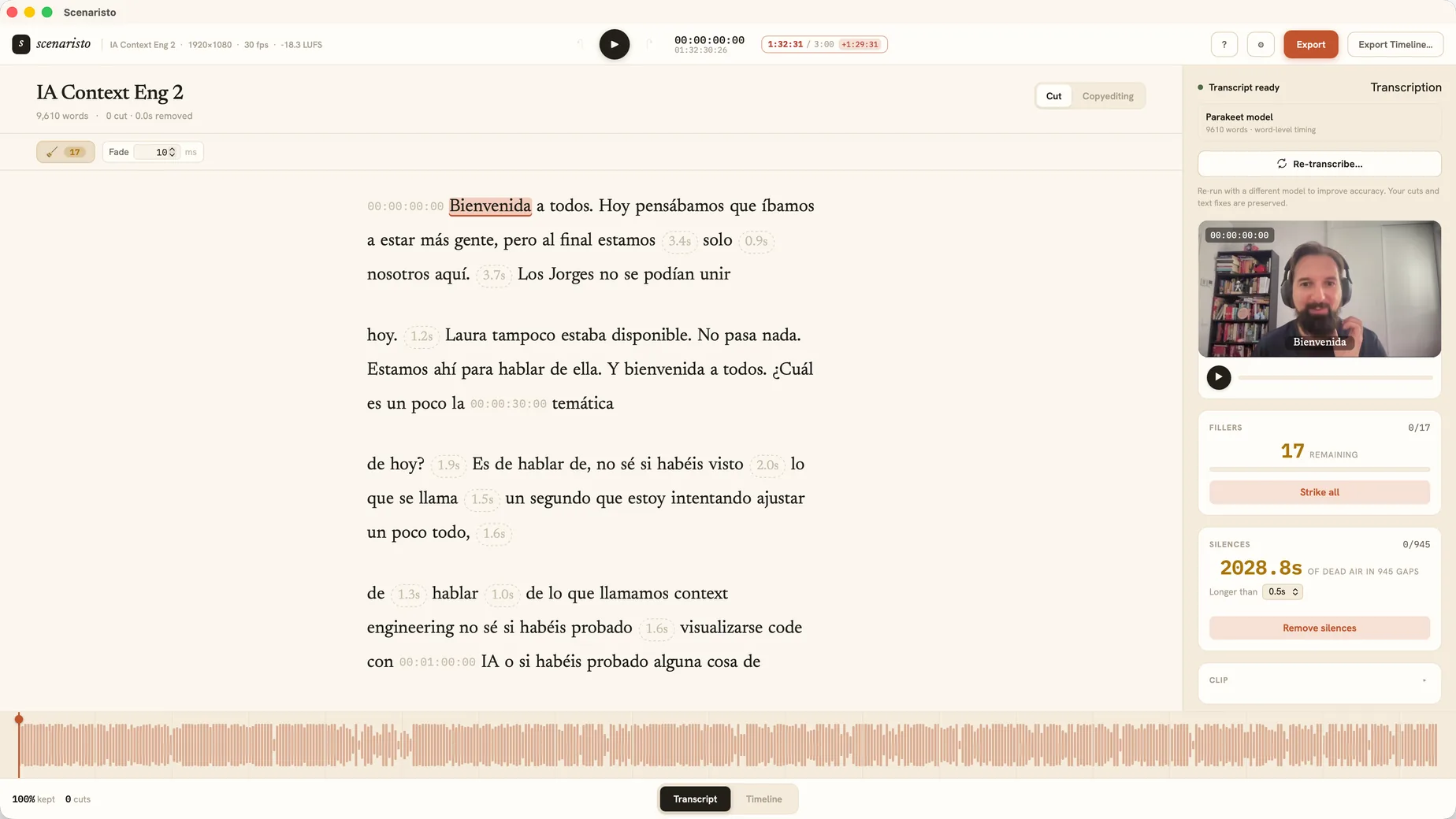 Editorial reader · 9,610 words · word-level timing
A real timeline, for the frame-level moments.
Most cuts happen in text. When one needs a frame rather than a sentence, the timeline is a real editor. It shows the video you are making: each clip drawn as a filmstrip of its own frames, running down through its sound and its words, with every cut an edit point you can trim, roll, crossfade, or split. Drag a clip somewhere else and the story follows: playback, the transcript, captions, and chapters all take the new order.
- Trim, roll, and split by the frame. Drag an edge and watch the new length before you let go, nudge it a frame at a time with
,and., or press⌘Bto split at the playhead. - Move and delete whole clips. Drag a clip to a new place, cut it with
⌘Xand paste it at the playhead with⌘V, or press Delete to take it out, dead air and all. - A playhead that works like your NLE's. J, K, and L to play, arrow keys by the frame, a ruler in
HH:MM:SS:FF, and a timecode you can type to jump straight there.
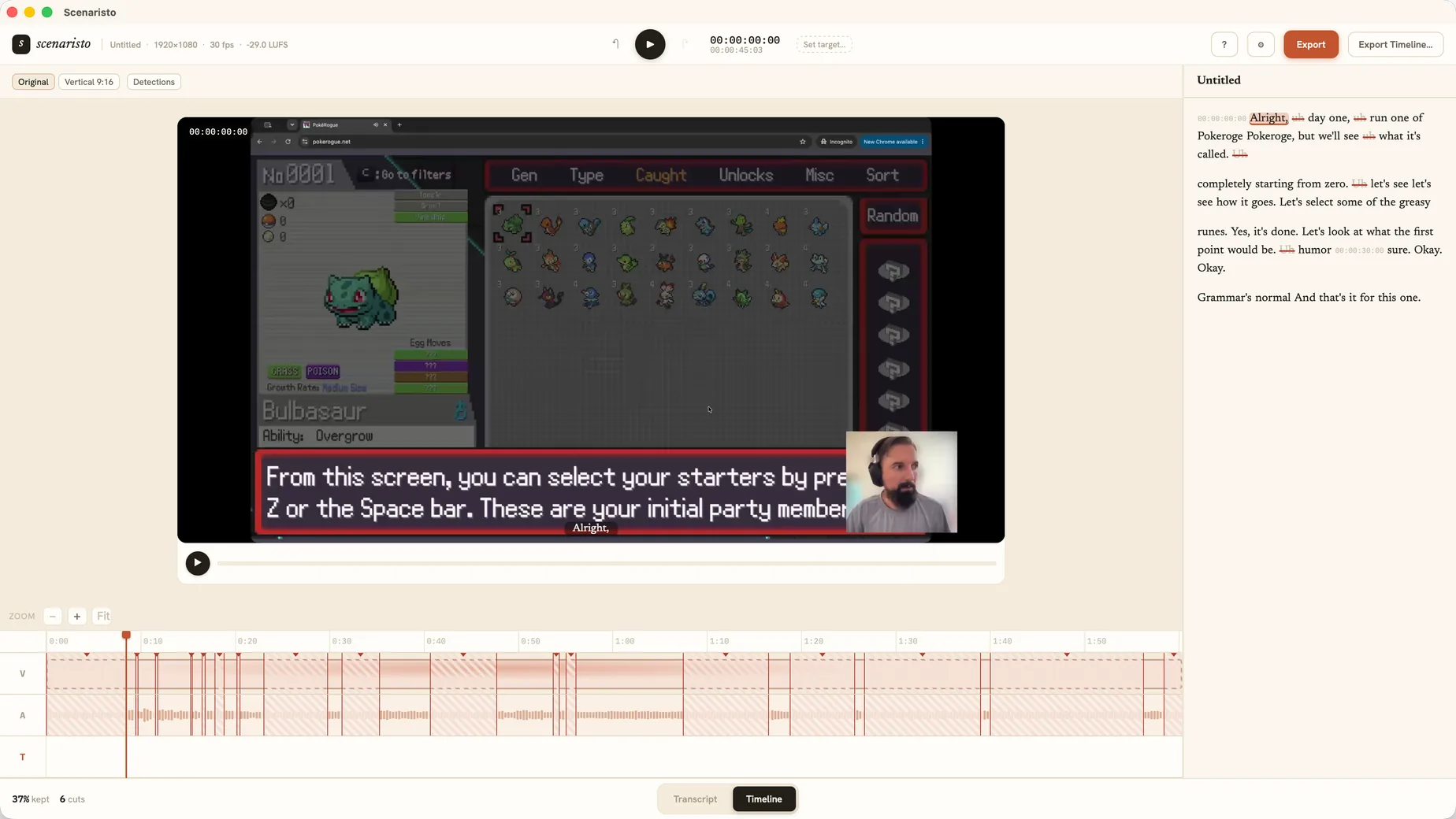 Timeline · filmstrip · edit points
Quiet features that do real work.
Strikethrough soft-delete
Preview a cut before committing. Struck text stays visible but greyed; playback and export skip it; one click restores it, losslessly.
Non-destructiveFillers & silences, cleaned up
Every "um", "uh", and over-long pause is flagged, with the filler vocabulary following the language of the recording: a Spanish recording gets a Spanish list. Review them one by one, or strike the whole set in a single click.
Bulk or per-instanceCaptions for free
Export SRT and VTT from the corrected, post-cut transcript, with cues grouped at natural punctuation, or burn them straight into the picture for Shorts. Your subtitles match the final edit exactly, no second pass.
SRT · VTTCorrection mode
Fix a mistranscribed name without touching a frame of video, in a mode that keeps corrections and cuts cleanly apart. Correct all fixes every match in one step, and a per-project term list teaches the recogniser the names you say most.
Text-only · Correct allMulti-speaker labels
Interviews and panels split into speaker turns you can rename right in the transcript, each voice told apart consistently across the whole file. Tell it how many voices there are, or let it decide; trying another count re-runs only the speaker pass.
On-device diarizationThe Audio page
A page that listens to your edit and only speaks up when something is off: loudness away from its target or peaking too hot, background noise sitting close under your voice, a room that rings. Each finding says what it heard in plain words, and one Fix sets it right on export: loudness mastered to its target (Podcast −16 LUFS, or −14 LUFS for social video) within ±0.5 LU under a true-peak ceiling, noise and echo removed on your machine. A / B plays the same sixteen seconds before and after, so you hear the difference first.
Loudness · Noise · EchoChapters
Pin chapters on words in the transcript. Export a YouTube 00:00 list to paste, plus ID3 CHAP frames so podcast apps show them natively. Chapters move with your cuts.
Send to your NLE
Export an FCPXML 1.11 timeline, cuts, crossfades, and chapter markers preserved, to finish in Final Cut Pro, Premiere, or DaVinci Resolve. No media is re-encoded.
FCPXML handoffExport All, in one pass
Render MP4 at source resolution, encoded to the platforms' recommended H.264 spec, or MP3/WAV for podcasts, or bundle video, captions, and chapters behind a single dialog with a shared name. Duration equals source minus your cuts.
MP4 · MP3 · WAVKeep the best take
Record the same line until it lands, and a scan finds every attempt. Review each group in the transcript, audition the takes side by side, pick the keeper, and accept to strike the rest. Proposals, not edits, until you say so.
Take detectionHighlights, vertical and captioned
Select a range and press ⌘⇧K to mark it as a highlight, and Export Highlights writes it as its own 9:16 or 1:1 MP4 with a re-timed SRT: auto-framing on your face, platform safe-area guides, and captions burned into the picture for muted autoplay, previewed exactly as they ship.
9:16 · 1:1 · ⌘⇧KZoom cuts
Punch in on a clip by 5 to 15%, held on the speaker's eyeline, and the cut into it reads as a second camera while the neighbouring clips stay wide. It is offered only on a single talking head with room to zoom, and tells you why when it can't be.
Talking head · 5 to 15%Deliverable Modes
On first import, pick what you're making from three pictures (Podcast, Long-form, or Short-form) and the right export presets and workspace layout are set in one step. Always changeable, never re-imposed.
Podcast · Long-form · Short-formOne project, one file
A project is a single .scenar file. Back it up, duplicate it, move it like any document. Every edit is a non-destructive layer inside it, never a change to your source media.
Labels & reactions
Tag what matters as you read with ⌘⇧L: labels overlap, group by name, and follow your cuts. A reactions scan finds the moments your voice spikes, the screams and the laughs that no word search can find.
Your language
The app speaks English, Spanish, and French, and a Region setting writes numbers the way your country does. The filler list follows the language of the recording, whatever language the app is in.
English · Español · FrançaisOn-device, and honest about it.
Transcription runs on best-in-class open speech models, downloaded on demand and checksum-pinned. Nothing ships bundled in the installer. Pick the fast default, or reach for a heavier model when accuracy calls for it. See the full model family.
Import
MP4, MOV, MKV and WebM (VP9/Opus) for video. MP3, WAV, AAC, and M4A for audio. Drag-and-drop; the clip lands on the timeline before transcription even starts.
Transcription models
Nothing is bundled. The default Parakeet model and every alternative download on demand with pinned checksums, so the app stays small and you only fetch what you use.
macOS
macOS 14 Sonoma or later on Apple silicon. 8 GB of memory minimum, 16 GB recommended. Encode and decode ride the OS media engines, so exports are fast without a render farm. Projects live in a library with Recents and Save As, and transcription runs in the background with live progress on long files.
Windows
The same editor on Windows 10 x64, with a code signed installer and portable project files that open on macOS too. 8 GB of memory minimum, 16 GB recommended; discrete GPU recommended, not required. Download for Windows.
See your edit before you
touch a timeline.
Free today · no account required